Install  Zed on
  Nvidia Jetson
Zed
Your last next editor
Zed is a minimal code editor crafted for speed and collaboration with humans and AI.
To run: Menu -> Programming -> Zed
To run in a terminal: zed
Fortunately, Zed is very easy to install on your Nvidia Jetson in just two steps.
- Install Pi-Apps - the best app installer for Nvidia Jetson.
- Use Pi-Apps to install Zed.
Compatibility
For the best chance of this working, we recommend using the latest version of Nvidia Jetpack for your specific Jetson (Jetson Xavier or Jetson Orin).
Zed will run on L4T Ubuntu ARM64.
Install Pi-Apps
Pi-Apps is a free tool that makes it incredibly easy to install the most useful programs on your Nvidia Jetson with just a few clicks.
Open a terminal and run this command to install Pi-Apps:
wget -qO- https://raw.githubusercontent.com/Botspot/pi-apps/master/install | bashFeel free to check out the Pi-Apps source code here: https://github.com/Botspot/pi-apps
Install Zed
Now that you have Pi-Apps installed, it is time to install Zed.
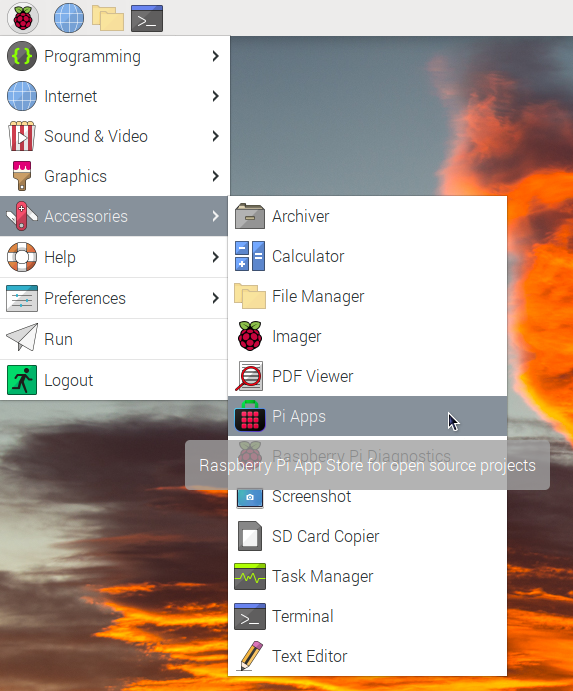
First launch Pi-Apps from your start menu:
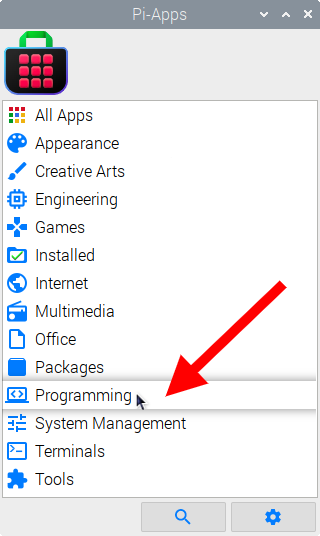
Then click on the Programming category.
Now scroll down to find Zed in the list.
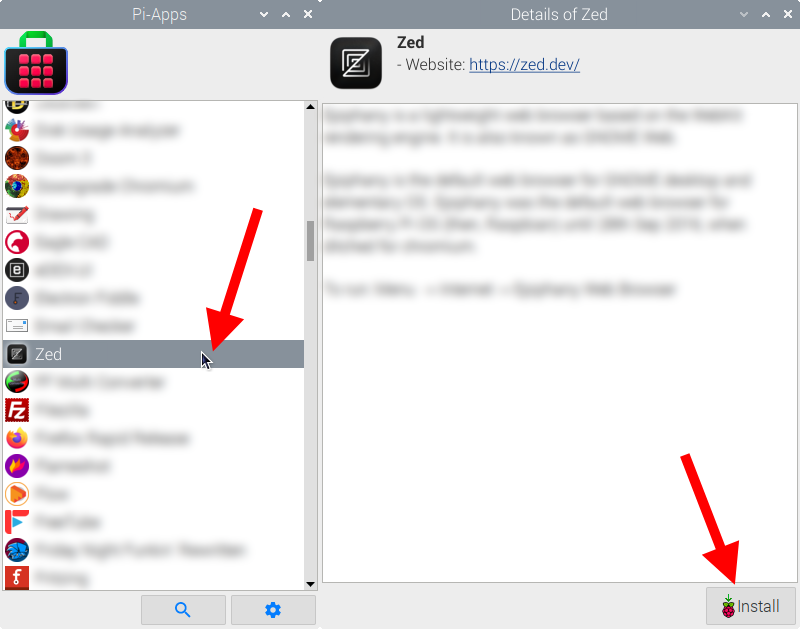
Just click Install and Pi-Apps will install Zed for you!
Pi-Apps is a free and open source tool made by Botspot, theofficialgman, and other contributors. Find out more at https://pi-apps.io