Install  Reaper on
  Raspberry Pi
Reaper
REAPER is a complete digital audio production application for computers, offering a full multitrack audio and MIDI recording, editing, processing, mixing and mastering toolset.
REAPER supports a vast range of hardware, digital formats and plugins, and can be comprehensively extended, scripted and modified.REAPER's full, flexible feature set and renowned stability have found a home wherever digital audio is used: commercial and home studios, broadcast, location recording, education, science and research, sound design, game development, and more.
From mission-critical professional environments to students' laptops, there is a single version of REAPER, fully featured with no artificial limitations. You can evaluate REAPER in full for 60 days. A REAPER license is affordably priced and DRM-free.
This is a free 60-day trial of Reaper (Nothing disabled).
This app installs Reaper, as well as ReaPack, the (unofficial) Reaper Package Manager, with over 1300 Plugins/Extentions available.To run from Teminal: reaper
To run from Menu: Menu -> Sound and Video -> Reaper
To run ReaPack: Open Reaper, go to the "Extentions" menu, and hover over the "ReaPack" item.
Fortunately, Reaper is very easy to install on your Raspberry Pi in just two steps.
- Install Pi-Apps - the best app installer for Raspberry Pi.
- Use Pi-Apps to install Reaper.
Compatibility
For the best chance of this working, we recommend using the latest 64-bit version of Raspberry Pi OS, which is currently version Trixie.
Raspberry Pi OS has 32-bit and 64-bit variants, both of which will run on most Raspberry Pi computers, including the Pi 3, Pi 4, and Pi5.
Reaper will run on either PiOS 32-bit or 64-bit.
Install Pi-Apps
Pi-Apps is a free tool that makes it incredibly easy to install the most useful programs on your Raspberry Pi with just a few clicks.
Open a terminal and run this command to install Pi-Apps:
wget -qO- https://raw.githubusercontent.com/Botspot/pi-apps/master/install | bashFeel free to check out the Pi-Apps source code here: https://github.com/Botspot/pi-apps
Install Reaper
Now that you have Pi-Apps installed, it is time to install Reaper.
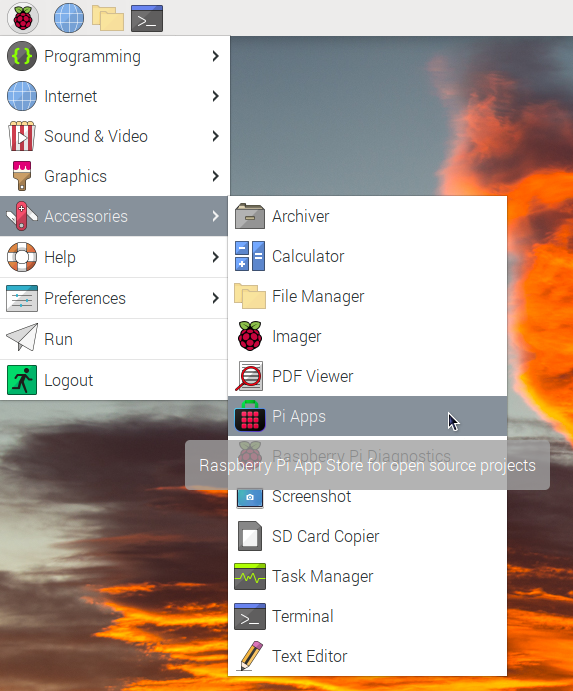
First launch Pi-Apps from your start menu:
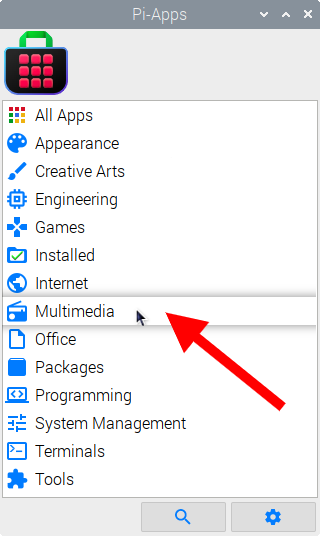
Then click on the Multimedia category.
Now scroll down to find Reaper in the list.
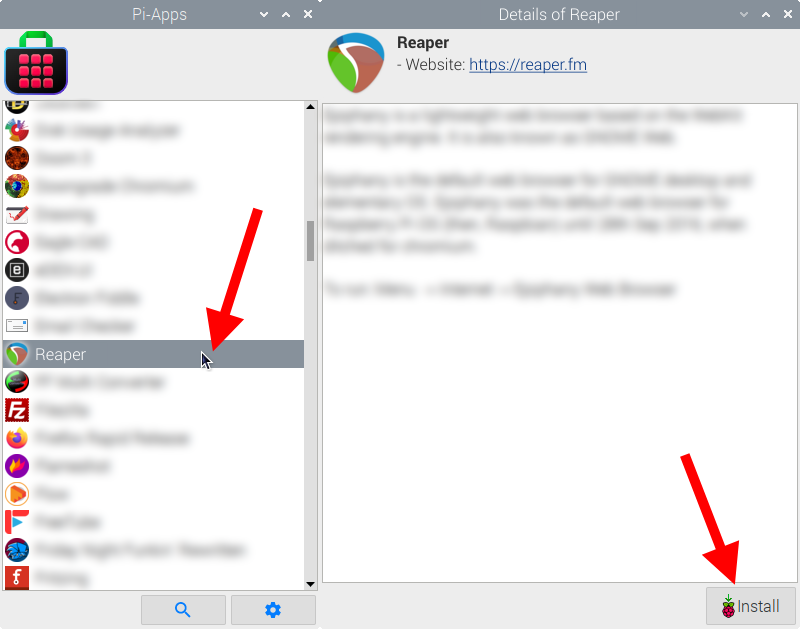
Just click Install and Pi-Apps will install Reaper for you!
Pi-Apps is a free and open source tool made by Botspot, theofficialgman, and other contributors. Find out more at https://pi-apps.io