Install  qBittorrent on Linux ARM Device
qBittorrent
Open-source software alternative to µTorrent.
To run: Menu -> Internet -> qBittorrent
To run in a terminal: qbittorrentThis app is a bittorrent downloading and uploading application simiar to uTorrent, Transmission and Deluge.
- Polished µTorrent-like User Interface
- No Ads
- Well-integrated and extensible Search Engine
- Simultaneous search in many Torrent search sites
- Category-specific search requests (e.g. Books, Music, Software)
- RSS feed support with advanced download filters (incl. regex)
- Many Bittorrent extensions supported:
- Magnet links
- Distributed hash table (DHT), peer exchange protocol (PEX), local peer discovery (LSD)
- Private torrents
- Encrypted connections
- and many more...
- Remote control through Web user interface, written with AJAX
- Nearly identical to the regular GUI
- Sequential downloading (Download in order)
- Advanced control over torrents, trackers and peers
- Torrents queueing and prioritizing
- Torrent content selection and prioritizing
- Bandwidth scheduler
- Torrent creation tool
- IP Filtering (eMule & PeerGuardian format compatible)
- IPv6 compliant
- UPnP / NAT-PMP port forwarding support
Fortunately, qBittorrent is very easy to install on your Linux ARM Device in just two steps.
- Install Pi-Apps - the best app installer for Linux ARM Device.
- Use Pi-Apps to install qBittorrent.
Compatibility
For the best chance of this working, we recommend using the latest LTS of Ubuntu or Debian from your hardware manufacturer.
qBittorrent will run on either an Ubuntu/Debian ARM32 OS or ARM64 OS.
Install Pi-Apps
Pi-Apps is a free tool that makes it incredibly easy to install the most useful programs on your Linux ARM Device with just a few clicks.
Open a terminal and run this command to install Pi-Apps:
wget -qO- https://raw.githubusercontent.com/Botspot/pi-apps/master/install | bashFeel free to check out the Pi-Apps source code here: https://github.com/Botspot/pi-apps
Install qBittorrent
Now that you have Pi-Apps installed, it is time to install qBittorrent.
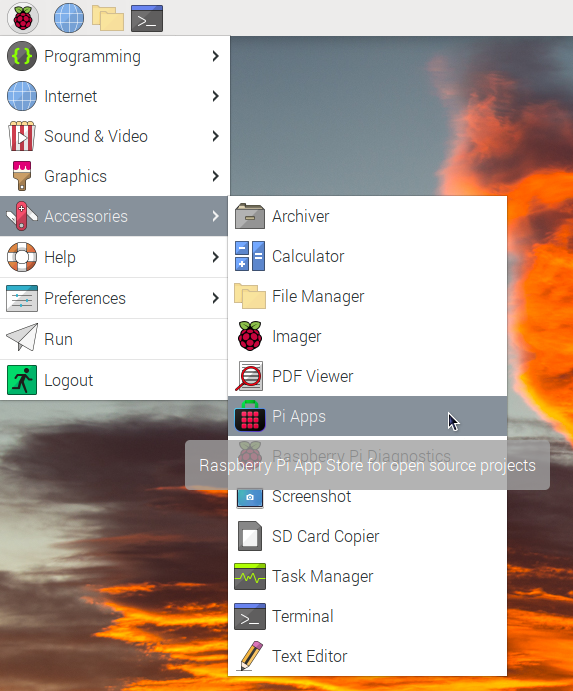
First launch Pi-Apps from your start menu:
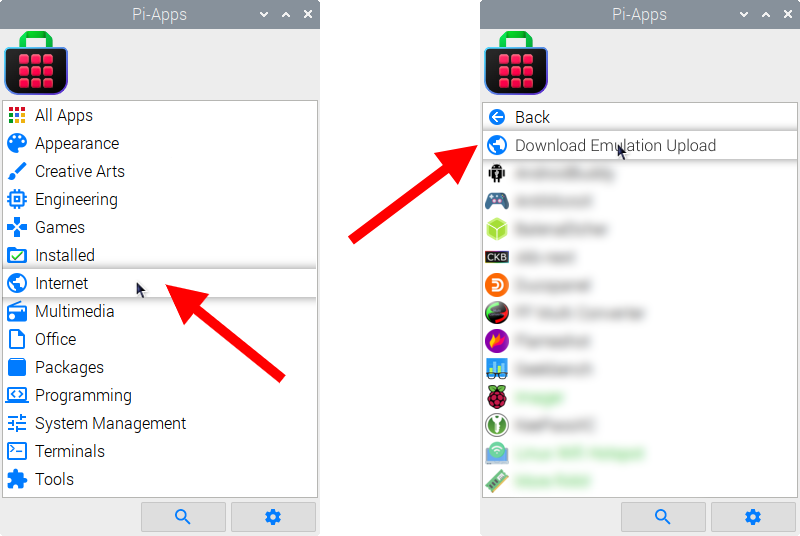
Then click on the Internet category, which leads to the Download & Upload category.
Now scroll down to find qBittorrent in the list.
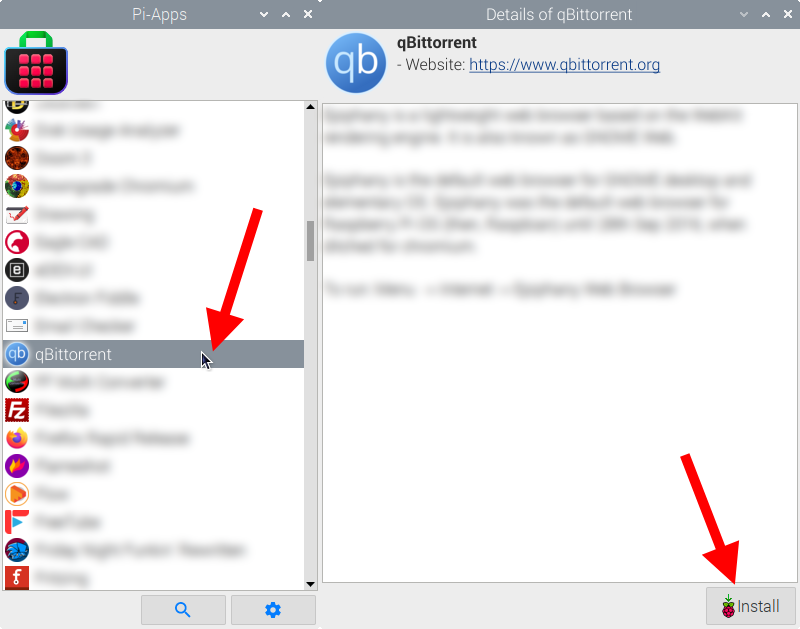
Just click Install and Pi-Apps will install qBittorrent for you!
Pi-Apps is a free and open source tool made by Botspot, theofficialgman, and other contributors. Find out more at https://pi-apps.io