Install  LEGO Technic Race on
  Nintendo Switch
LEGO Technic Race
Classic LEGO Technic Race (Pullback Racer) from 2016, running in Waydroid. A one-time local patch makes the abandoned game start and take mouse input.
Requires Waydroid, which will be installed first if needed.To run:
Menu -> Waydroid -> Race 2
To run in a terminal: waydroid app launch com.lego.technic.raceHOW IT WORKS: Pi-Apps downloads the original Android APK, checks its SHA-256, patches it on your computer, signs it with a local key, and installs it into Waydroid.
- The original game hangs on its loading screen because its code cannot parse today's web server headers. The patch changes that one function.
- The game's native launcher stops responding to the mouse and window titlebar in Waydroid's multi-window mode, so the patch makes the Java launcher the entry point.
NOTE: this adds com.lego.technic.race to Waydroid's persist.waydroid.fake_touch list (mouse is treated as touch for this app only). Other apps are not affected, and uninstalling removes the entry.
- The game no longer downloads its configuration. It uses the copy bundled in the app, so it does not contact LEGO's servers for that. (Other network code in the game is not blocked.)
- Three permissions that only produced pop-ups (phone state, storage) are removed.
NOTE: online features such as LEGO ID and leaderboards no longer exist, and the game does not need them.
KNOWN QUIRK: if the Android titlebar covers part of the game, unmaximize and maximize the window once.
Fortunately, LEGO Technic Race is very easy to install on your Nintendo Switch in just two steps.
- Install Pi-Apps - the best app installer for Nintendo Switch.
- Use Pi-Apps to install LEGO Technic Race.
Compatibility
For the best chance of this working, we recommend using the latest version of Switchroot L4T Ubuntu Noble, which is currently version 5.1.2 Ubuntu Noble.
LEGO Technic Race will run on L4T Ubuntu ARM64.
Install Pi-Apps
Pi-Apps is a free tool that makes it incredibly easy to install the most useful programs on your Nintendo Switch with just a few clicks.
Open a terminal and run this command to install Pi-Apps:
wget -qO- https://raw.githubusercontent.com/Botspot/pi-apps/master/install | bashFeel free to check out the Pi-Apps source code here: https://github.com/Botspot/pi-apps
Install LEGO Technic Race
Now that you have Pi-Apps installed, it is time to install LEGO Technic Race.
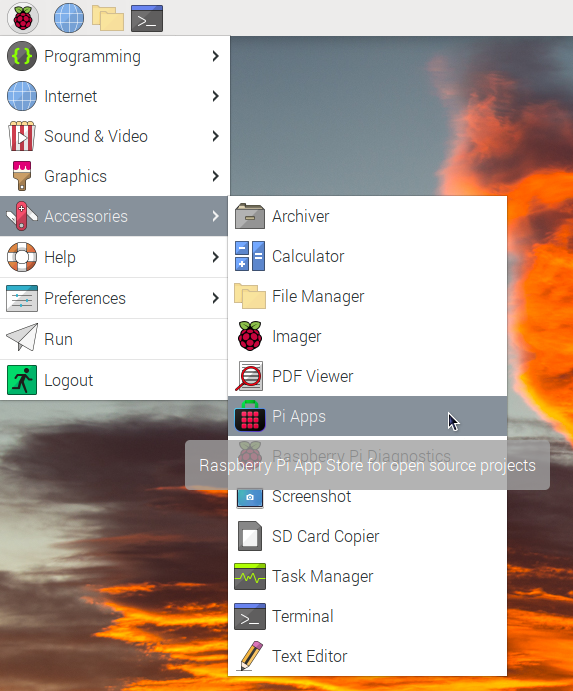
First launch Pi-Apps from your start menu:
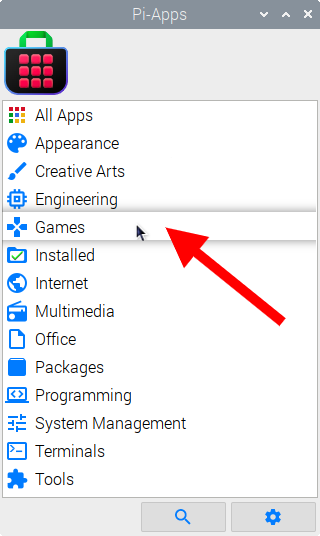
Then click on the Games category.
Now scroll down to find LEGO Technic Race in the list.
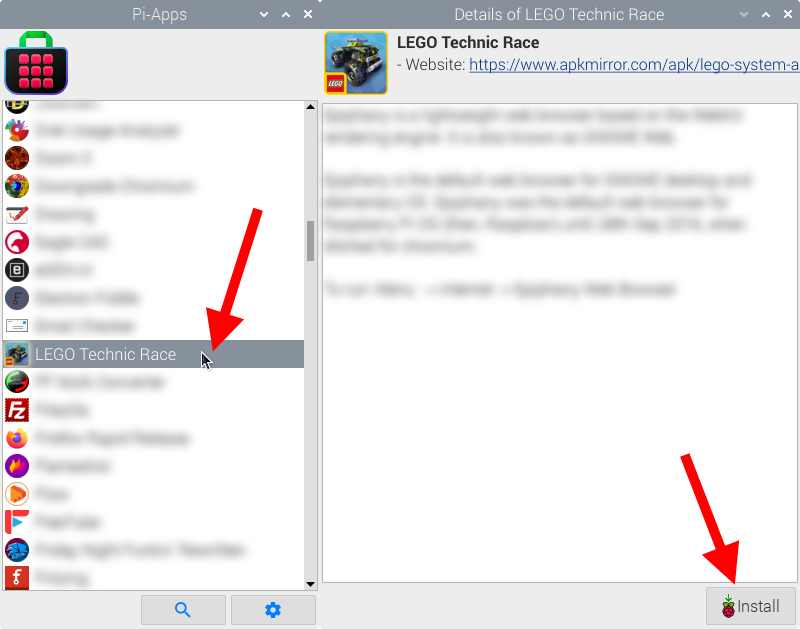
Just click Install and Pi-Apps will install LEGO Technic Race for you!
Pi-Apps is a free and open source tool made by Botspot, theofficialgman, and other contributors. Find out more at https://pi-apps.io