Install  iDescriptor on
  Raspberry Pi
iDescriptor
Open-source management tool for iPads and iPhones
This is a native Linux alternative to iTunes and macOS. Simply connect your iDevice using a USB cable (or wireless pairing) and start browsing files, installing apps, viewing the display, or more advanced actions like checking battery health.Features include:
- iFuse Filesystem Mount: Mount the device's filesystem and use it as a regular drive for reading and writing files.
- Wireless Gallery Import: Import photos wirelessly (requires the Shortcuts app on the iDevice).
- App Store: Download and install apps directly from the Apple Store (requires Apple ID sign-in).
- AirPlay / Live Screen: Cast your device screen to your computer.
- Virtual Location: Simulate GPS locations on your iDevice.
- Device Backups: Experimental support for backing up data from devices running iOS 13 and newer.
- Hardware Info: Read detailed battery information and check the authenticity of connected USB cables.
- SSH Terminal: Open a terminal on your jailbroken iDevice.
To run: Menu -> Accessories -> iDescriptor
To run in a terminal: flatpak run io.github.idescriptor.iDescriptor
Fortunately, iDescriptor is very easy to install on your Raspberry Pi in just two steps.
- Install Pi-Apps - the best app installer for Raspberry Pi.
- Use Pi-Apps to install iDescriptor.
Compatibility
For the best chance of this working, we recommend using the latest 64-bit version of Raspberry Pi OS, which is currently version Trixie.
Raspberry Pi OS has 32-bit and 64-bit variants, both of which will run on most Raspberry Pi computers, including the Pi 3, Pi 4, and Pi5.
iDescriptor will only run on PiOS 64-bit. Pi-Apps will not let you install iDescriptor on PiOS 32-bit.
Install Pi-Apps
Pi-Apps is a free tool that makes it incredibly easy to install the most useful programs on your Raspberry Pi with just a few clicks.
Open a terminal and run this command to install Pi-Apps:
wget -qO- https://raw.githubusercontent.com/Botspot/pi-apps/master/install | bashFeel free to check out the Pi-Apps source code here: https://github.com/Botspot/pi-apps
Install iDescriptor
Now that you have Pi-Apps installed, it is time to install iDescriptor.
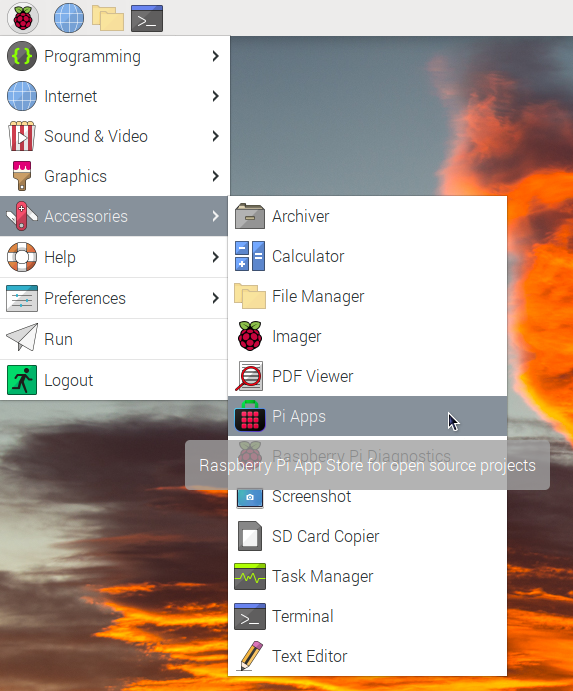
First launch Pi-Apps from your start menu:
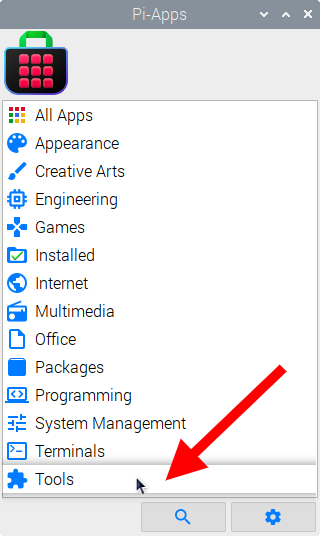
Then click on the Tools category.
Now scroll down to find iDescriptor in the list.
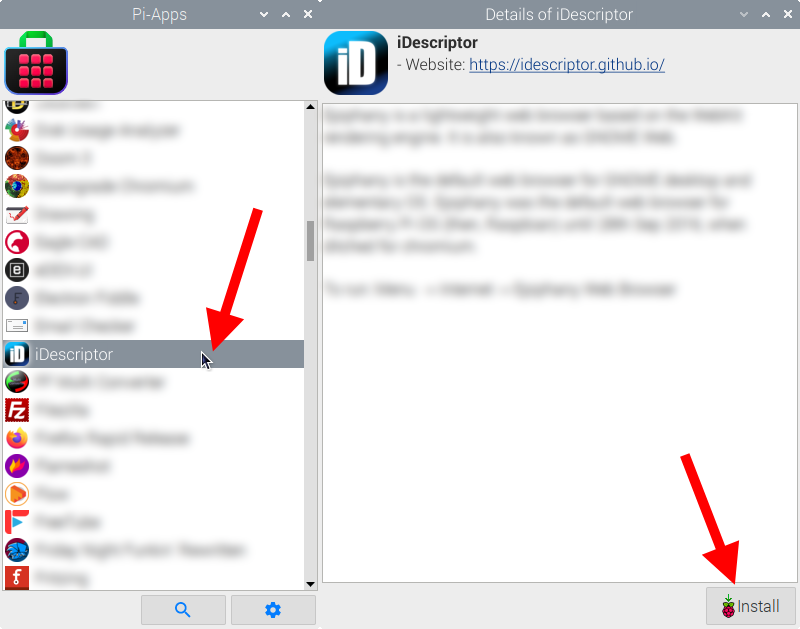
Just click Install and Pi-Apps will install iDescriptor for you!
Pi-Apps is a free and open source tool made by Botspot, theofficialgman, and other contributors. Find out more at https://pi-apps.io