Install  Antigravity on
  Raspberry Pi
Antigravity
Google's AI agent IDE powered by Gemini 3 Pro for autonomous, end-to-end software development.
Intended for the following programming languages: Python, Go, Java, C/C++, C#, PHP, Ruby.
To run: Menu -> Programming -> Antigravity
To run in a terminal: antigravityDescription and Features
Google Antigravity is an agent-first Integrated Development Environment (IDE) designed to handle complex, multi-step software tasks autonomously. It fundamentally changes the development workflow by allowing developers to manage and orchestrate an AI agent rather than writing every line of code manually.Key Usage:
Orchestration: Provide the agent with a high-level task (a detailed prompt) in the built-in Agent Manager, such as "Build a simple web application with user authentication."
Review and Approve: The agent generates an Implementation Plan and a Task List. The developer reviews these plans and approves the steps before execution begins.
Autonomous Execution: The agent autonomously writes, tests, and debugs the code, interacting with the editor, terminal, and integrated browser as needed.
Outstanding Features:
Agent-First Architecture: AI agents can perform complex tasks across the entire development stack (code, terminal, browser).
High Transparency: Provides detailed artifacts (plans, code diffs, logs, screenshots) for full visibility and control over the AI's actions.
Gemini 3 Integration: Leverage the power of advanced large language models for sophisticated code generation and problem-solving.
NOTE: This app uses an extremely insane workaround to run Google's closed-source language server (language_server_linux_arm) on ARM64 kernels that don't use 48-bit address space. It compiles a custom lightweight kernel and runs the language server inside a QEMU KVM virtual machine, then forwards all inputs (prompts) and outputs (responses) through network sockets to the rest of the IDE. If the chat in Antigravity seems broken, this extremely hacky workaround is likely at fault. Open an issue on pi-apps and we'll try to fix it for you.
Fortunately, Antigravity is very easy to install on your Raspberry Pi in just two steps.
- Install Pi-Apps - the best app installer for Raspberry Pi.
- Use Pi-Apps to install Antigravity.
Compatibility
For the best chance of this working, we recommend using the latest 64-bit version of Raspberry Pi OS, which is currently version Trixie.
Raspberry Pi OS has 32-bit and 64-bit variants, both of which will run on most Raspberry Pi computers, including the Pi 3, Pi 4, and Pi5.
Antigravity will only run on PiOS 64-bit. Pi-Apps will not let you install Antigravity on PiOS 32-bit.
Install Pi-Apps
Pi-Apps is a free tool that makes it incredibly easy to install the most useful programs on your Raspberry Pi with just a few clicks.
Open a terminal and run this command to install Pi-Apps:
wget -qO- https://raw.githubusercontent.com/Botspot/pi-apps/master/install | bashFeel free to check out the Pi-Apps source code here: https://github.com/Botspot/pi-apps
Install Antigravity
Now that you have Pi-Apps installed, it is time to install Antigravity.
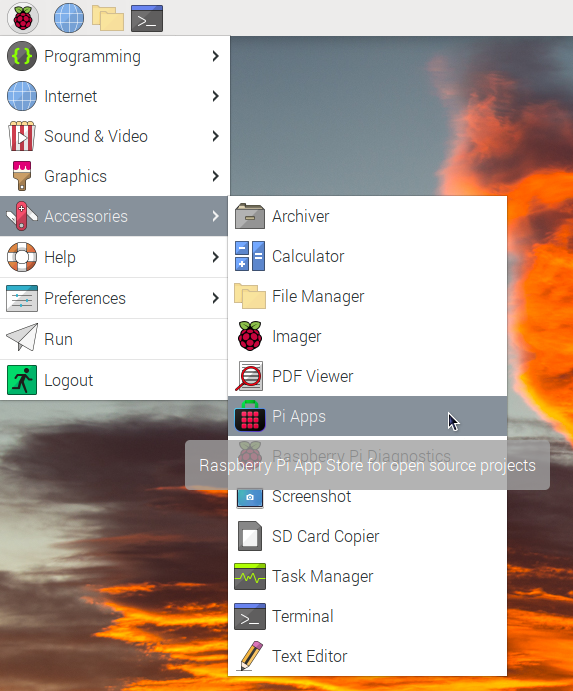
First launch Pi-Apps from your start menu:
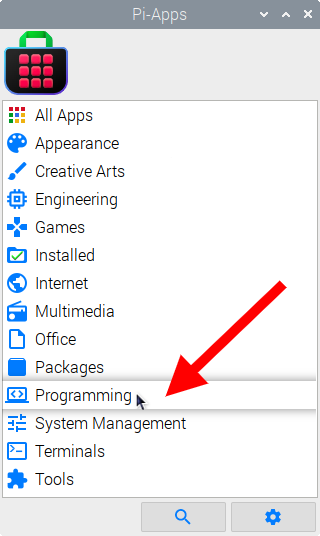
Then click on the Programming category.
Now scroll down to find Antigravity in the list.
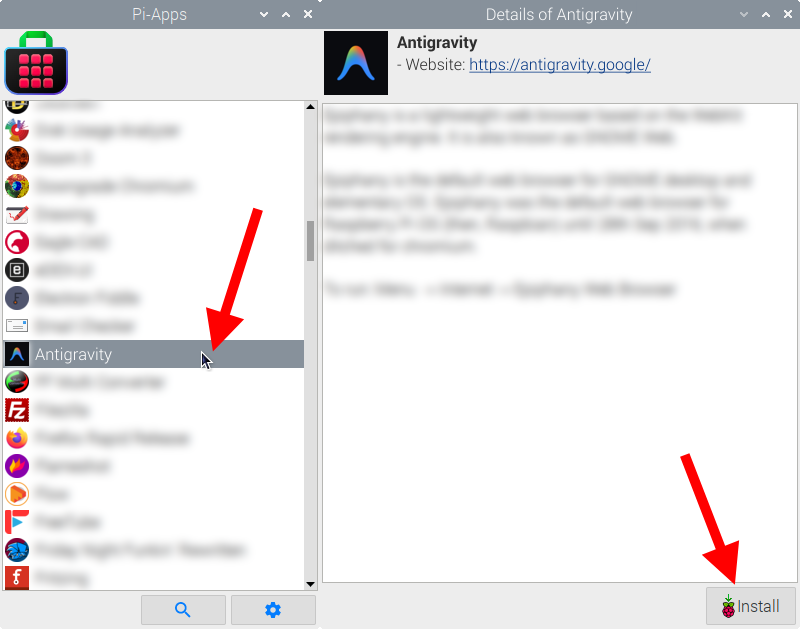
Just click Install and Pi-Apps will install Antigravity for you!
Pi-Apps is a free and open source tool made by Botspot, theofficialgman, and other contributors. Find out more at https://pi-apps.io